


Imagine a customer posts a TikTok raving about your product—unprompted, authentic, and exactly the kind of social proof you can’t manufacture. The only problem is: it lives on someone else’s account. You want to amplify it to your audience without stealing credit or awkwardly re-uploading it.
That’s where TikTok’s repost feature comes in. Reposting lets you share someone else’s public video to your followers while keeping the original creator credited. Done well, reposts help you stay visible, keep content flowing, and build trust—without trying to produce new videos every single day.
In this guide, you’ll learn what a repost is, why brands use reposts, exactly how to repost and undo reposts, and the do’s and don’ts that keep your account looking curated (not lazy).

What Is a TikTok Repost?
A TikTok repost is a way to share a video created by someone else to your followers. It’s different from uploading your own video, and it’s also different from downloading and re-posting (which can look like content theft).
When you repost a video:
- your followers may see it in their feed as content you shared
- the original creator remains credited
- it doesn’t become an “original post” that you filmed
- it’s a lightweight way to keep your feed active without filming daily
Think of reposting like curating. You’re not claiming authorship—you’re highlighting something worth watching, especially if it reinforces your brand, product story, or community vibe.
Why Repost on TikTok?
For ecommerce founders, creators, and service brands, reposting is more than a convenience feature. It’s a content strategy tool. Here are the main benefits.
Stay visible without burning out
Consistency matters on TikTok, but creating fresh videos every day is exhausting—especially when you’re also running product, fulfillment, customer support, and marketing. Reposts can fill gaps in your content calendar so you stay present even on busy weeks.
Turn customer love into social proof
User-generated content (UGC) is persuasive because it feels real. A repost can showcase:
- customer reviews and unboxings
- before/after results
- styling ideas and product hacks
- creator shoutouts
- authentic reactions that build trust instantly
For most brands, social proof is not a “nice to have.” It’s the difference between a viewer thinking “interesting” and thinking “I should buy.”
Build relationships with creators
Reposting is also a form of respect. When you repost a creator’s video (with credit intact), you’re signaling that you value their work. That can open doors to future collaborations, affiliate deals, or long-term creator partnerships.
Keep your feed fresh and varied
If your account only posts brand-made videos, your content might feel one-dimensional. Reposts introduce variety: different faces, different filming styles, different voices—while still staying aligned with your niche.
Learn what actually resonates
Reposting is a fast way to test content angles. If certain reposts consistently outperform your original videos, that’s a clue about what your audience wants. You can then create your own version—same hook, same topic, but filmed in your brand style.

How to Repost on TikTok (Step-by-Step)
The repost flow is simple, but it helps to follow a consistent process so you don’t repost random content that doesn’t match your brand.
Step 1: Find the right video to repost
Start by choosing content that fits at least one of these goals:
- trust: reviews, testimonials, honest product opinions
- education: how-to’s, tips, quick tutorials
- inspiration: styling ideas, use-case demonstrations, routines
- community: relatable moments, niche humor, customer stories
Ways to find repost-worthy videos:
- browse your “For You” page for relevant videos
- search hashtags tied to your niche (not just broad ones)
- check tagged mentions and creator posts about your product
- look through comments on your brand videos (people often link related content)
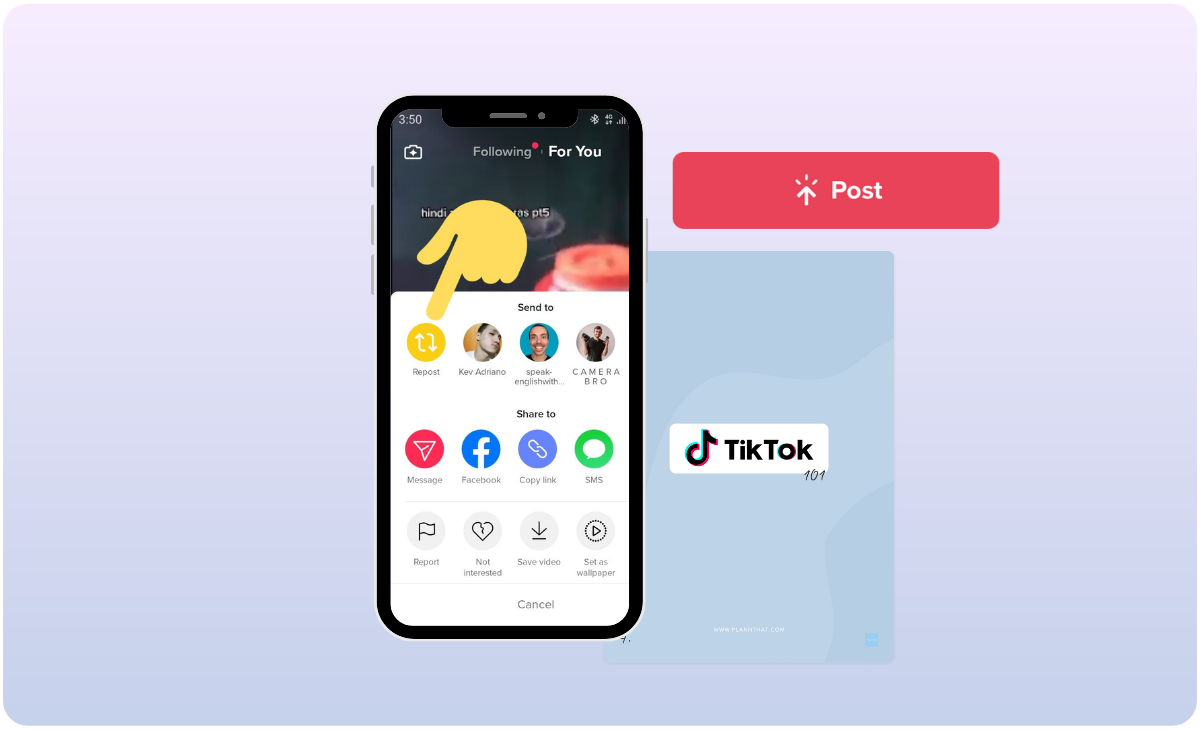
Step 2: Tap the Share arrow
Open the video, then tap the Share icon (the arrow). This opens the share menu where TikTok places quick actions.
Step 3: Tap “Repost”
Look for the Repost option and tap it. Once reposted, TikTok will share it to your followers as content you recommended.
That’s it. No editing needed. No downloading. No re-uploading. The credit stays with the original creator.
How to Undo a Repost on TikTok
Sometimes you repost something and later realize it’s not aligned with your brand, the creator updates context, or the video becomes controversial. Removing a repost is straightforward.
Step 1: Go to your profile
Open your profile page inside the app.
Step 2: Find your Reposts tab/section
Depending on your app version, TikTok may show a Reposts section where reposted videos are listed.
Step 3: Open the reposted video
Select the reposted video you want to remove.
Step 4: Remove the repost
Use the same menu where you reposted, then choose the option to remove/undo repost.
Quick note: undoing a repost doesn’t delete the original creator’s video. It simply removes your amplification of it.
Repost vs Duet vs Stitch: Which Should Brands Use?
Reposting is not the only way to share someone else’s content. Choosing the right format depends on your goal.
Repost
- Best for: amplifying social proof and keeping your feed active
- Why it works: fast, low effort, keeps credit intact
- Risk: can feel “too curated” if you never add your own voice
Duet
- Best for: reacting, adding commentary, building community presence
- Why it works: lets you appear on screen beside the original video
- Risk: takes more effort; can look forced if your reaction adds no value
Stitch
- Best for: responding to a clip, continuing a story, correcting misinformation
- Why it works: you borrow a short segment then add your take
- Risk: requires stronger scripting to feel natural
A simple brand rule: repost for amplification, duet for personality, stitch for education.
Best Practices: How to Repost Without Looking Lazy
Reposting helps, but only if your reposts feel intentional. Otherwise your account can look like a random content dump. Here’s how to keep reposting strategic.
Choose reposts that match your brand POV
The best reposts reinforce the story you want people to believe about your brand. For example:
- premium brand: repost quality-focused reviews, routine videos, craftsmanship content
- value brand: repost “best deal” comparisons, budget tips, real-life use cases
- wellness brand: repost calm routines, results narratives, education content
Prioritize social proof over “viral for the sake of viral”
Viral content isn’t always good for business. A repost should either build trust, educate, or attract the right audience. Random virality can bring the wrong followers who never convert.
Don’t over-repost
If your account only reposts, you lose identity. A good balance is:
- original content for your brand voice
- reposts for social proof and consistency
- duets/stitches for commentary and authority
Ask for permission when it’s sensitive
Even though reposting credits creators, if the content is very personal (health stories, sensitive topics, private moments), it’s good etiquette to comment or message the creator first. Respect builds long-term creator relationships.
Use repost insights to guide your original content
If a repost performs well, don’t stop there. Create your own follow-up video:
- explain the product benefit more clearly
- answer common questions from comments
- show a behind-the-scenes breakdown
- share a “how to use it” version
This is how reposts become a content engine rather than a shortcut.
How Brands Use Reposts to Drive Sales (Without Being Pushy)
The most effective TikTok selling doesn’t look like selling. Reposts help because they naturally show real-life use and credibility. Here are practical patterns that work.
Pattern 1: Repost customer reviews on a schedule
Pick one day per week for UGC reposts. This trains your audience to expect authentic feedback. It also creates a steady stream of content without inventing new concepts weekly.
Pattern 2: Repost “how people use it” content
If your product has multiple use cases, repost videos showing those use cases in the wild. This expands perceived value and can increase conversion because the product feels more versatile.
Pattern 3: Repost creator content, then make your own “explainer”
Repost the creator video first. Then publish an original follow-up video that answers the top questions viewers will have. This keeps you in control of the narrative while still leveraging creator credibility.
Pattern 4: Repost trend videos that fit your niche, not every trend
Trends are useful when they align with your audience’s identity. If a trend doesn’t fit your niche, reposting it can dilute your brand and confuse your positioning.
Ultimately, reposting supports sales by doing one thing extremely well: it reduces buyer skepticism.
How to Build a Simple Repost System (So You Don’t Wing It)
If you want reposting to actually help your business, you need a light system. Nothing complicated—just enough structure to keep it consistent.
A simple weekly structure
- 2 original posts (product use, founder POV, behind-the-scenes, education)
- 2 reposts (reviews, UGC, creator content)
- 1 duet or stitch (reaction, answers, commentary)
A simple saving workflow
- save videos you might repost into a collection
- each week, pick the best 2 based on relevance and clarity
- avoid reposting videos that conflict with your brand tone
A simple quality checklist
- Is the content aligned with what we sell and who we serve?
- Does it build trust or show real outcomes?
- Would we be proud if new customers saw this first?
Reposting works best when it looks like a deliberate curation choice, not content recycling.
FAQ
How long does a repost last on TikTok?
Your repost remains visible until you remove it manually. The algorithm may stop pushing it to feeds over time, but it can still be found under your reposted content.
How do I see my reposts on TikTok?
Go to your profile and look for the reposts section/tab. TikTok’s interface can vary by app version, but reposted videos are typically grouped for quick access.
Why can’t I see the repost button?
Some accounts or videos may not show the repost option depending on TikTok updates, region, or creator settings. If you don’t see it, try updating the app or testing with different videos.
Is reposting the same as re-uploading someone’s video?
No. Reposting keeps credit attached to the original creator and shares their post. Re-uploading usually removes attribution and can create trust issues with creators and audiences.
Should brands repost every day?
Not usually. If you repost too often, your account can lose identity. A healthier approach is mixing reposts with original content and occasional duets/stitches so your brand voice stays strong.
Conclusion
Reposting on TikTok is one of the simplest ways to stay active, amplify social proof, and build creator relationships—especially when you’re busy running a business and can’t film constantly. The key is to repost with intention: choose content that reinforces trust, matches your brand POV, and teaches your audience what your product or service actually solves.
If you want to grow with TikTok for Business using reposts as a real marketing asset—not just a shortcut, combine consistent reposting with conversion-focused originals, strong social proof, and smart follow-ups, then scale results through better creative testing, clearer offers, trust-building, and lifecycle marketing that turns views into customers.
We only recommend tools we've tested and trust. This post may include affiliate links, meaning we may earn a commission if you choose to purchase - at no extra cost to you.
